

The following article is a condensed version of the user guide. You can learn about more features under the Plugin Interface Overview.
Overview
A legend in American recording history, the MM-310 defined the Quad Eight sound — warm, wide, and effortlessly musical. From motion picture stages to hit records, its discrete, transformer-balanced circuitry remains sought after for its unmistakable presence and tone.
In partnership with Quad Eight Electronics, we’ve recreated this coveted piece of hardware for the modern era. Through meticulous component-level modeling, every nuance of its analog warmth, harmonic depth, and tonal smoothness has been captured — resulting in a powerful tool that delivers the authentic Quad Eight sound with the flexibility demanded by modern engineers.
Artists Presets
The plugin includes artist presets from Alvin Wee, Bainz, Bryan DiMaio, Calin Enache, Cole Nystrom, Connor H. Carrol, Ekzakt, Jeff Braun, Johnny Morgan, KTHRASH, Maor Appelbaum Mastering, Mark Williams, Mike Avenaim, Nicol Wheeler and Taylor Larson. The presets can be accessed through the plugin preset menu.
Global Plugin Features
The top section of every MixWave plugin interface includes a range of global plugin features, detailed in the Mixing Plugin Global Features article. Additionally, it features a preset browser, which is explained in the Plugin Presets and Locations article.
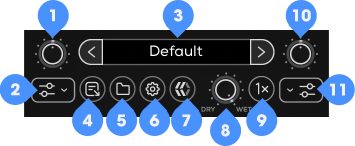
Input Gain
Input Filters
Preset Browser
Save Preset
Open Preset Folder
Settings
About
Mix
Oversampling
Output Gain
Output Filters
Engine Modes
The Quad Eight MM-310 includes multiple engine modes accessible from the Settings menu. Each mode affects internal EQ behavior and control resolution.
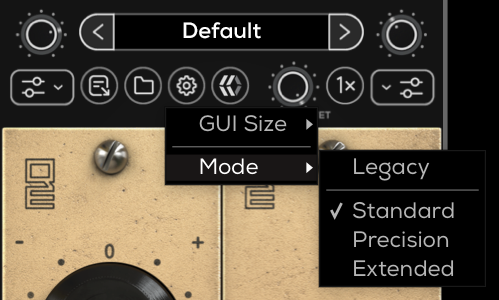
Legacy
The original engine behavior from version 1.0.0 of the plugin.
This mode preserves the exact processing characteristics and control behavior used in earlier versions for full preset compatibility and recall.
Standard
Uses the updated processing engine while maintaining the original control ranges and resolution.
Precision
Uses the Standard engine improvements while increasing the resolution of the EQ gain controls.
In this mode:
HF, MF, and LF gain controls operate in 1 dB increments instead of 2 dB steps.
Control ranges remain the same as Standard mode.
Extended
Builds on Precision mode by adding both increased control resolution and an expanded EQ gain range.
In this mode:
HF, MF, and LF controls operate in 1 dB increments.
The EQ gain range is expanded to –16 dB to +16 dB.
Quad Eight MM-310
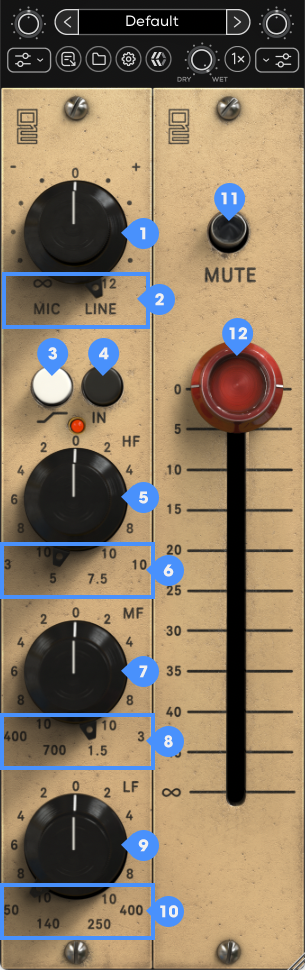
Input Gain
Adjusts the amount of Input Gain applied to the selected Input Type.
Input Type (Mic/Line)
Selects between the Mic and Line preamp inputs. Mic will provide increased gain and saturation characteristics. Line offers cleaner operation with extended headroom.
HF (High Frequency) Shelf
Toggles the High Frequency Band between Shelf and Peak modes. When engaged, the High Frequency band functions as a shelving EQ for broad tonal adjustments. When disengaged, the band operates as a bell filter centered around the selected frequency.
EQ On/Off
Activated or bypasses the equalizer section. When disengaged, the signal passes through the preamp and output stages without EQ processing. When engaged, all EQ bands become active.
HF (High Frequency) Gain
Determines the amount of boost or cut applied to the selected High Frequency band.
HF (High Frequency) Select
Determines the center or shelf frequency affected by the High Frequency Gain control. These frequencies provide a range of options for presence, clarity, and air. Available frequencies: 3 kHz, 5 kHz, 7.5 kHz, 10 kHz.
MF (Middle Frequency) Gain
Determines the amount of boost or cut applied to the selected Mid Frequency band.
MF (Middle Frequency) Select
Determines the operating frequency of the Mid Frequency band. Use these points to enhance or reduce tonal focus within the low-mid and upper-mid regions. Available frequencies operating in Peak mode: 400 Hz, 700 Hz, 1.5 kHz, 3 kHz.
LF (Low Frequency) Gain
Determines the amount of boost or cut applied to the selected Low Frequency band.
LF (Low Frequency) Select
Determines the frequency affected by the Low Frequency Gain control. These frequencies cover the full range of low-end shaping from sub-bass to low-mid clarity. Available frequencies: Shelf: 50 Hz, 140 Hz, Peak: 250 Hz, 400 Hz.
Mute
Silences the plugin output signal.
Output Gain
Adjusts the output level of the signal after preamp and EQ processing.