

The following article is a condensed version of the user guide. You can learn about more features under the Plugin Interface Overview.
Overview
Blending intricate technique with an unmistakable sense of melody, Yvette Young has carved out a voice entirely her own. Her playing moves effortlessly between delicate ambience, shimmering cleans, expressive modulation, and explosive walls of texture, driven by a style that feels as emotional as it is technical. Built around movement, dynamics, and atmosphere, her sound transforms the guitar into something deeply expressive and cinematic.
Faithfully modeled from the amps, pedals, and effects behind her signature sound, this collection captures the detail, responsiveness, and layered character that define her tones.
Global Plugin Features
The top section of every MixWave plugin interface includes a range of global plugin features, detailed in the Amp Plugin Global Features article. Additionally, it features a preset browser, which is explained in the Plugin Presets and Locations article.
Drive
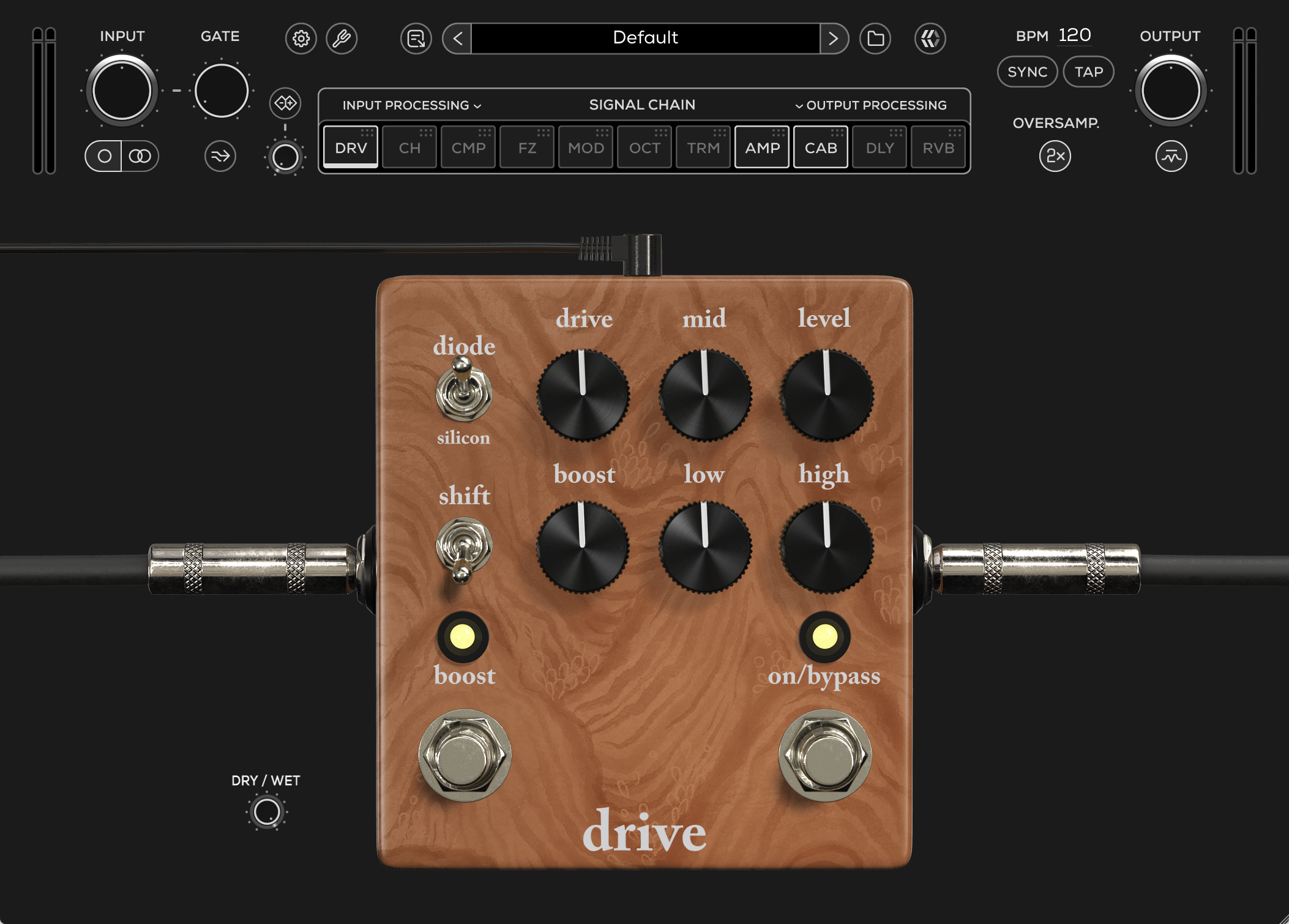
Diode
Selects between clipping modes to alter the response, compression, and headroom of the Drive pedal.
Mosfet: Smooth clipping with increased headroom and a more open, dynamic response.
Open: Disables diode clipping for the most headroom and least compression, allowing the gain stages to respond more naturally.
Silicon: Tighter, more compressed asymmetric clipping with a more aggressive and saturated character.
To change the Diode mode, click and drag the control up or down to select between the Mosfet, Open, and Silicon clipping modes.
Drive
Adjusts the amount of gain and saturation, ranging from light grit to heavy overdrive.
Mid
Active midrange boost or cut for shaping the presence and focus of the tone. The affected frequency range is selected with the Shift switch.
Level
Adjusts the overall output volume of the Drive pedal.
Shift
Selects the frequency range controlled by the Mid knob. Up targets higher mids around 1kHz for added presence and cut. Down targets lower mids around 300Hz for a thicker, fuller response.
Boost (Knob)
Adjusts the amount of gain added by the Boost circuit, providing up to 20dB of additional mid-focused drive when engaged.
Low
Adjusts the low-frequency shelving EQ.
High
Adjusts the high-frequency shelving EQ.
Boost (Switch)
Engages or disengages the Boost circuit.
On / Bypass
Engages or disengages the Drive effect.
Dry / Wet
Controls the blend between the dry (clean) input signal and the wet (processed) signal.
Chorus
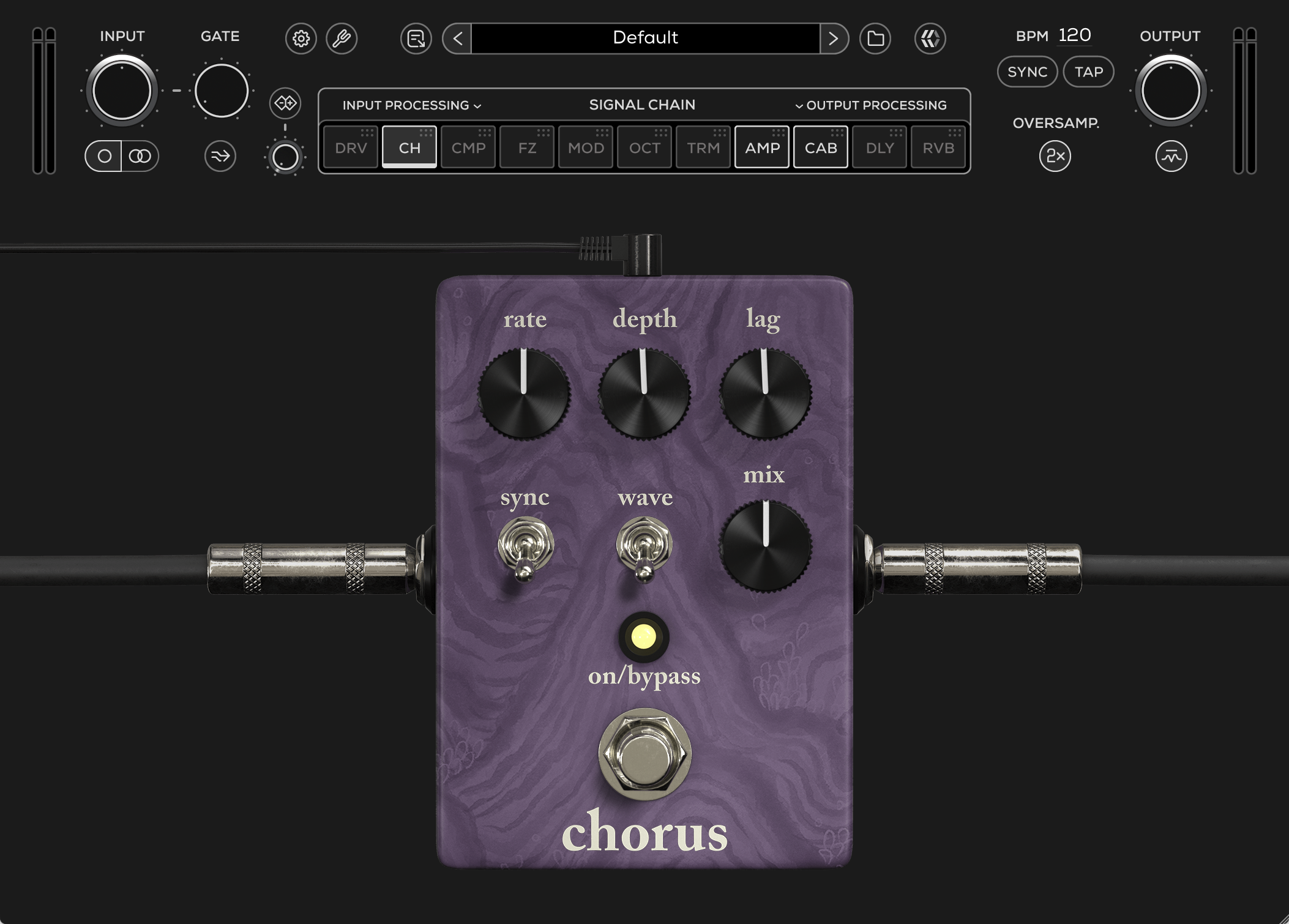
Rate
Adjusts the speed of the LFO modulation sweep.
Lower settings produce subtle movement, while higher settings create faster, more pronounced modulation.
Depth
Controls the amplitude of the LFO modulation.
Lower settings provide subtle movement, while higher settings create deeper, wider modulation sweeps.
Lag
Sets the center delay time that the LFO modulates around.
Lower settings produce smoother, tighter modulation, while higher settings introduce more exaggerated detuning and unstable modulation textures.
Sync
Synchronizes the modulation rate to the host DAW tempo.
Wave
Selects the modulation waveform shape.
Mix
Controls the blend between the dry (clean) input signal and the wet (processed) signal.
On / Bypass
Engages or bypasses the Chorus effect.
Compressor
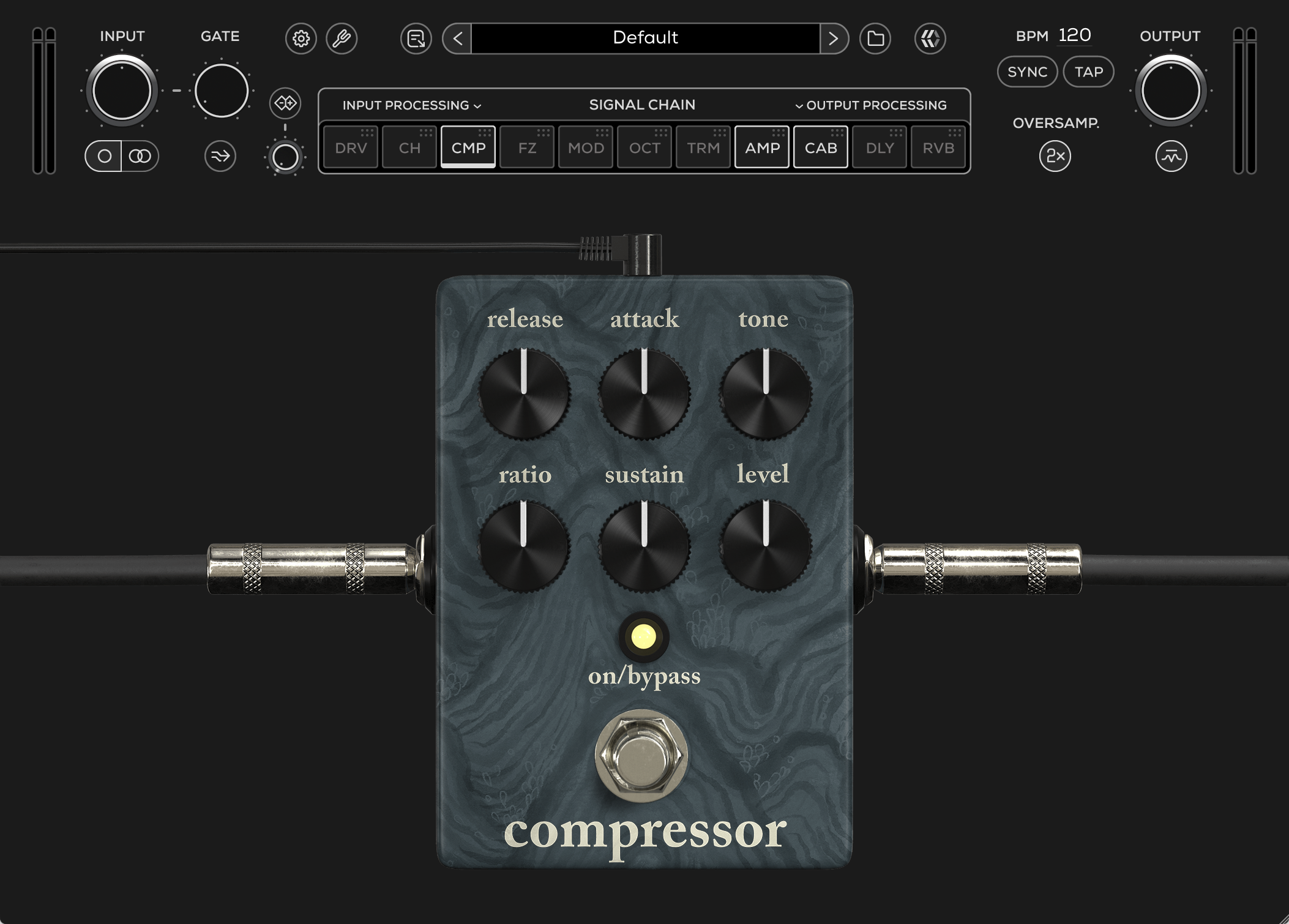
Release
Controls how quickly the compressor recovers after gain reduction occurs.
Lower settings provide a faster release for a more immediate and responsive feel, while higher settings create a slower, smoother recovery.
Attack
Controls how quickly the compressor reacts to incoming signal peaks.
Lower settings produce a fast, immediate response, while higher settings allow more transient attack to pass through before compression engages.
Tone
Adjusts the overall tonal balance of the compressed signal.
Lower settings reduce high frequencies for a darker response, while higher settings add top-end presence and brightness. The response is nearly flat around lower-mid settings.
Ratio
Controls the intensity of the compression by determining how strongly gain reduction affects the signal.
Higher settings produce heavier compression and a more controlled response, while lower settings retain more natural dynamics and output character.
Sustain
Controls the amount of compression and overall signal drive into the compressor circuit.
Lower settings produce lighter compression with a more natural response, while higher settings create heavier compression, increased sustain, and a more active compression character.
Level
Adjusts the overall output volume of the Compressor pedal.
On / Bypass
Engages or bypasses the Compressor effect.
Fuzz
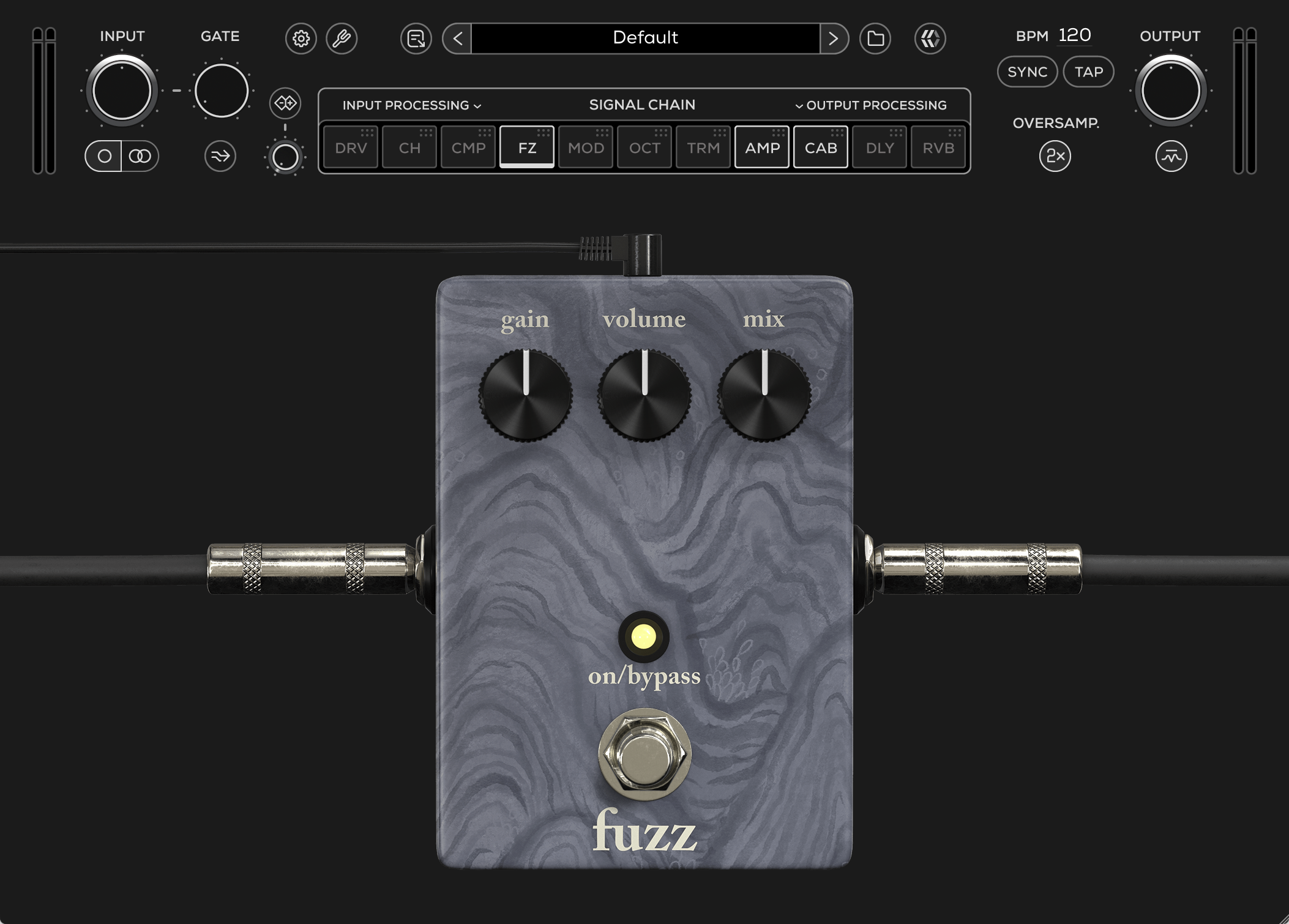
Gain
Sets the input gain and the amount of distortion.
Volume
Adjusts the output level of the Fuzz pedal.
Mix
Controls the blend between the dry (clean) input signal and the wet (processed) signal.
On / Bypass
Engages or bypasses the Fuzz effect.
Lo-Fi Modulator
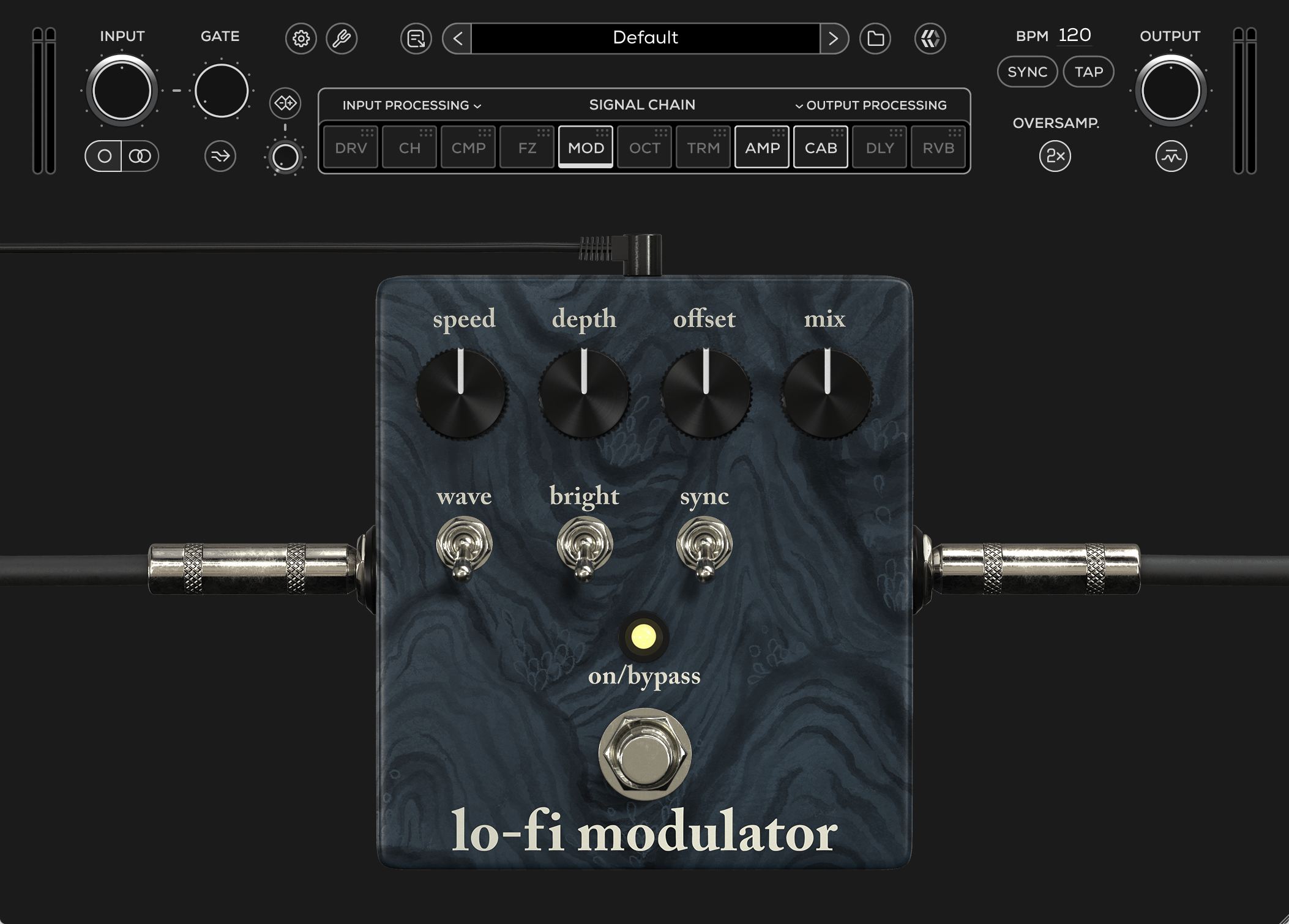
Speed
Adjusts the speed of the modulation sweep.
Lower settings produce slow, subtle movement, while higher settings create faster, more intense modulation textures.
Depth
Controls the intensity of the modulation applied to the wet signal.
Lower settings provide gentle movement, while higher settings create deeper, more dramatic modulation.
Offset
Sets the delay time difference between the dry and modulated signals.
Lower settings produce tighter, more traditional modulation textures, while higher settings introduce increasingly exaggerated detuning and lo-fi character.
Mix
Controls the blend between the dry (clean) input signal and the wet (processed) signal.
Wave
Selects the modulation waveform shape. Up is a triangle wave with smooth and flowing modulation movement. Down is a square wave with abrupt, stepped modulation for a more glitchy and aggressive character.
Bright
Shapes the high-frequency response of the wet signal. On is full-range modulation response. Off reduces high frequencies on the wet signal for a darker, more vintage-inspired texture.
Sync
Synchronizes the modulation rate to the host DAW tempo
On / Bypass
Engages or bypasses the Lo-Fi Modulator effect.
Octave
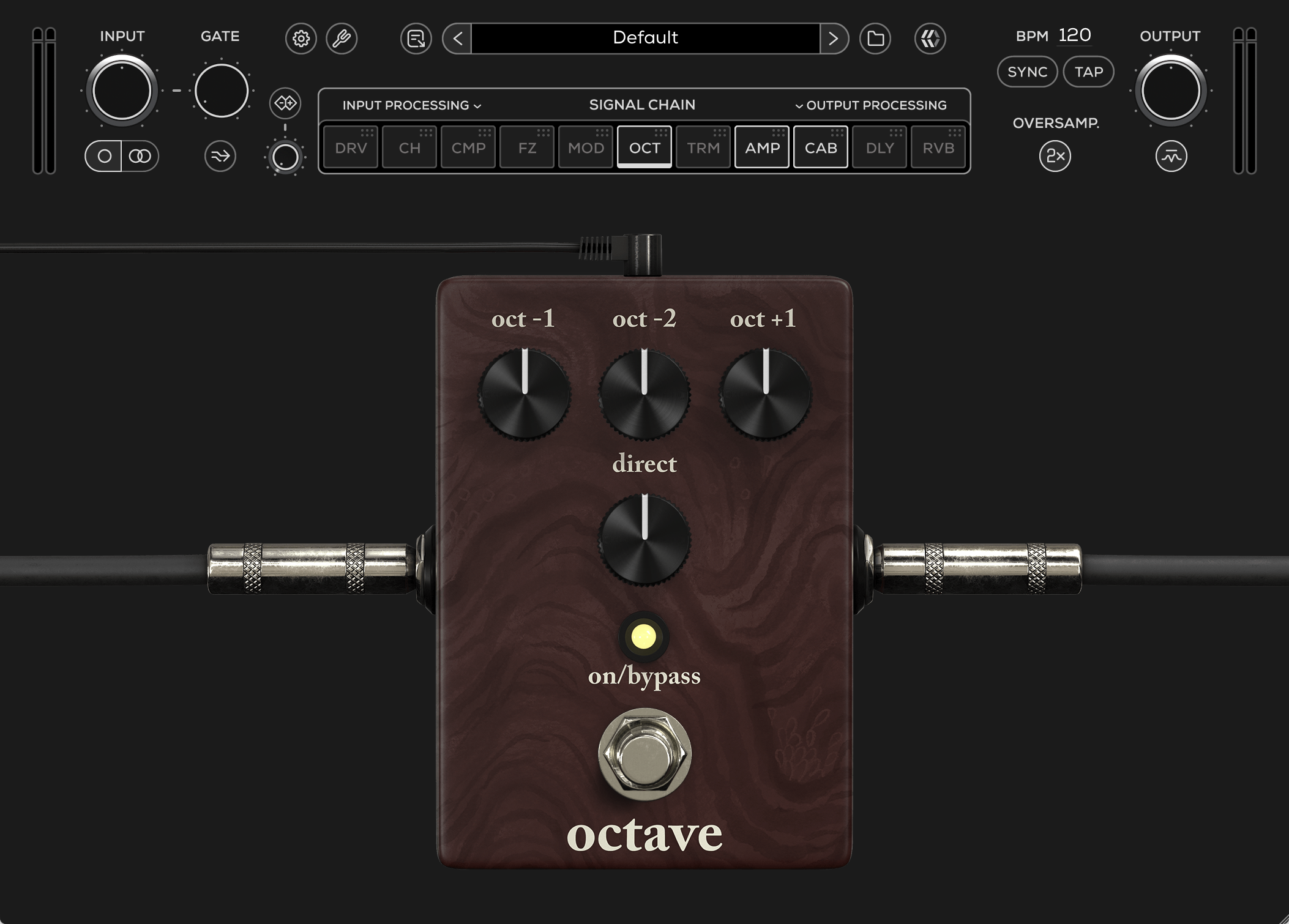
Oct -1
Adjusts the level of the signal pitched one octave below the original input signal.
Oct -2
Adjusts the level of the signal pitched two octaves below the original input signal.
Oct +1
Adjusts the level of the signal pitched one octave above the original input signal.
Direct
Adjusts the level of the original dry input signal.
On / Bypass
Engages or bypasses the Octave effect.
Tremolo
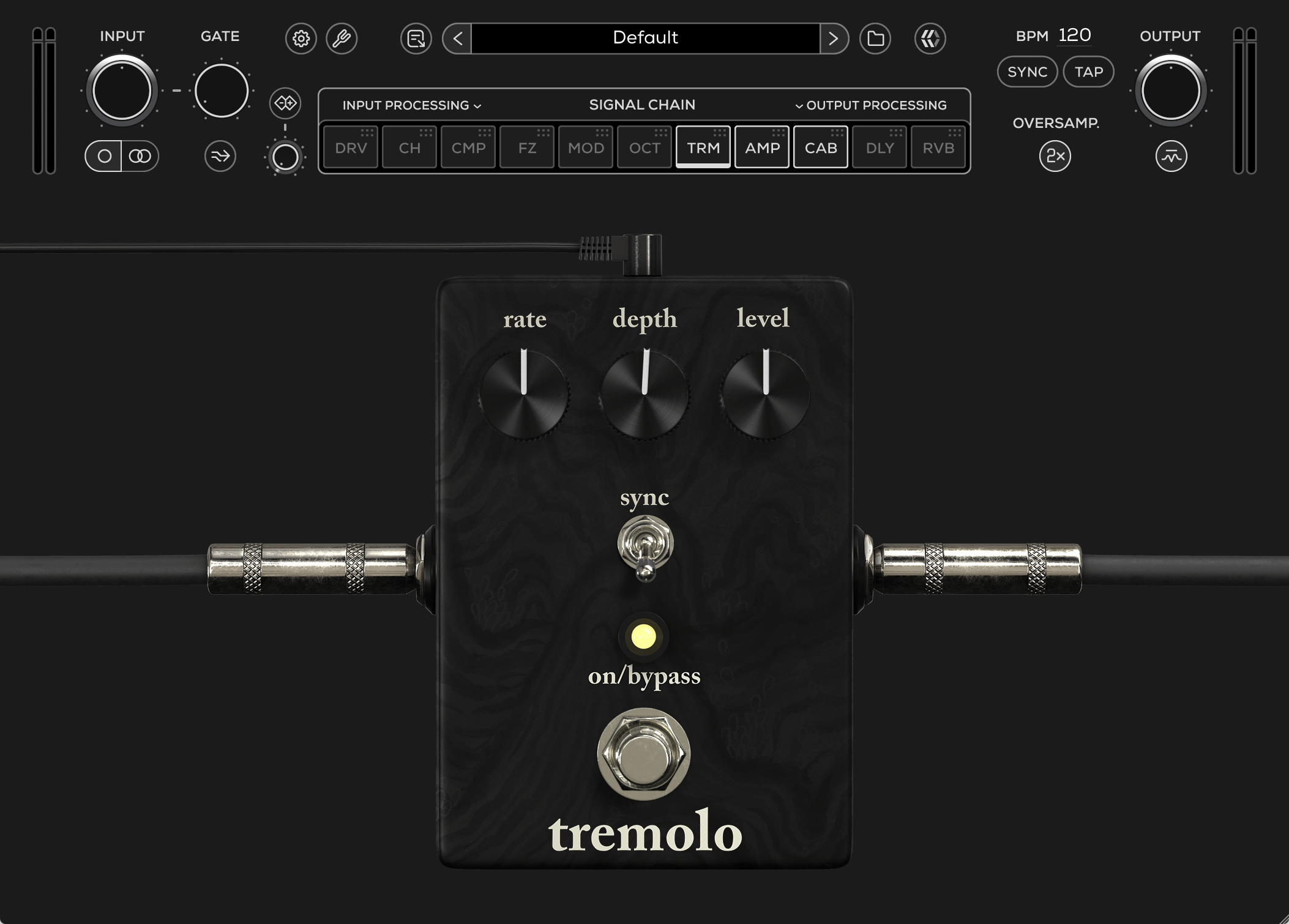
Rate
Adjusts the speed of the modulation sweep.
Lower settings produce slow, subtle movement, while higher settings create faster, more pronounced tremolo pulses.
Depth
Controls the intensity of the modulation applied to the signal.
Lower settings produce subtle movement, while higher settings create deeper and more dramatic volume modulation.
Level
Adjusts the overall output volume of the Tremolo pedal.
Sync
Synchronizes the modulation rate to the host DAW tempo.
On / Bypass
Engages or bypasses the Tremolo effect.
Delay
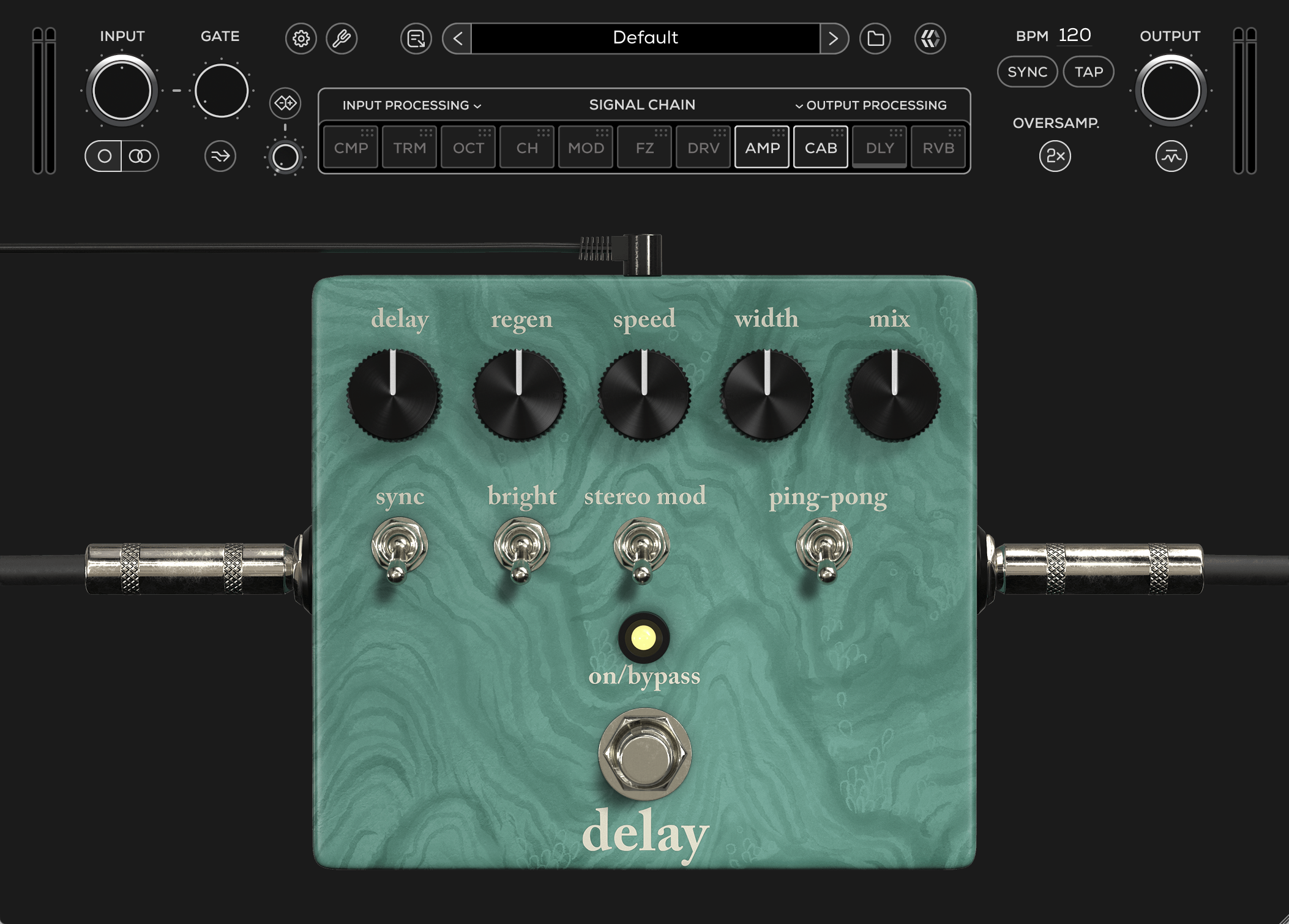
Delay
Adjusts the delay time between repeats.
Lower settings produce shorter slapback-style delays, while higher settings create longer ambient repeats.
Regen
Controls the amount of feedback fed back into the delay line, determining the number of repeats.
Lower settings produce fewer repeats, while higher settings create longer and more sustained delay trails.
Speed
Adjusts the speed of the modulation applied to the delay repeats.
Lower settings produce slow and subtle movement, while higher settings create faster modulation textures.
Width
Adjusts the stereo width and depth of the modulation effect.
Mix
Controls the blend between the dry (clean) input signal and the wet (processed) delay signal.
Sync
Synchronizes the delay time to the host DAW tempo.
Bright
Engages a brighter voicing for the delay repeats, emphasizing high-frequency detail and presence.
Stereo Mod
Engages stereo modulation on the delay repeats for a wider and more spatial modulation effect.
Ping-Pong
Alternates the delay repeats between the left and right stereo channels for a wider stereo image.
On / Bypass
Engages or bypasses the Delay effect.
Reverb
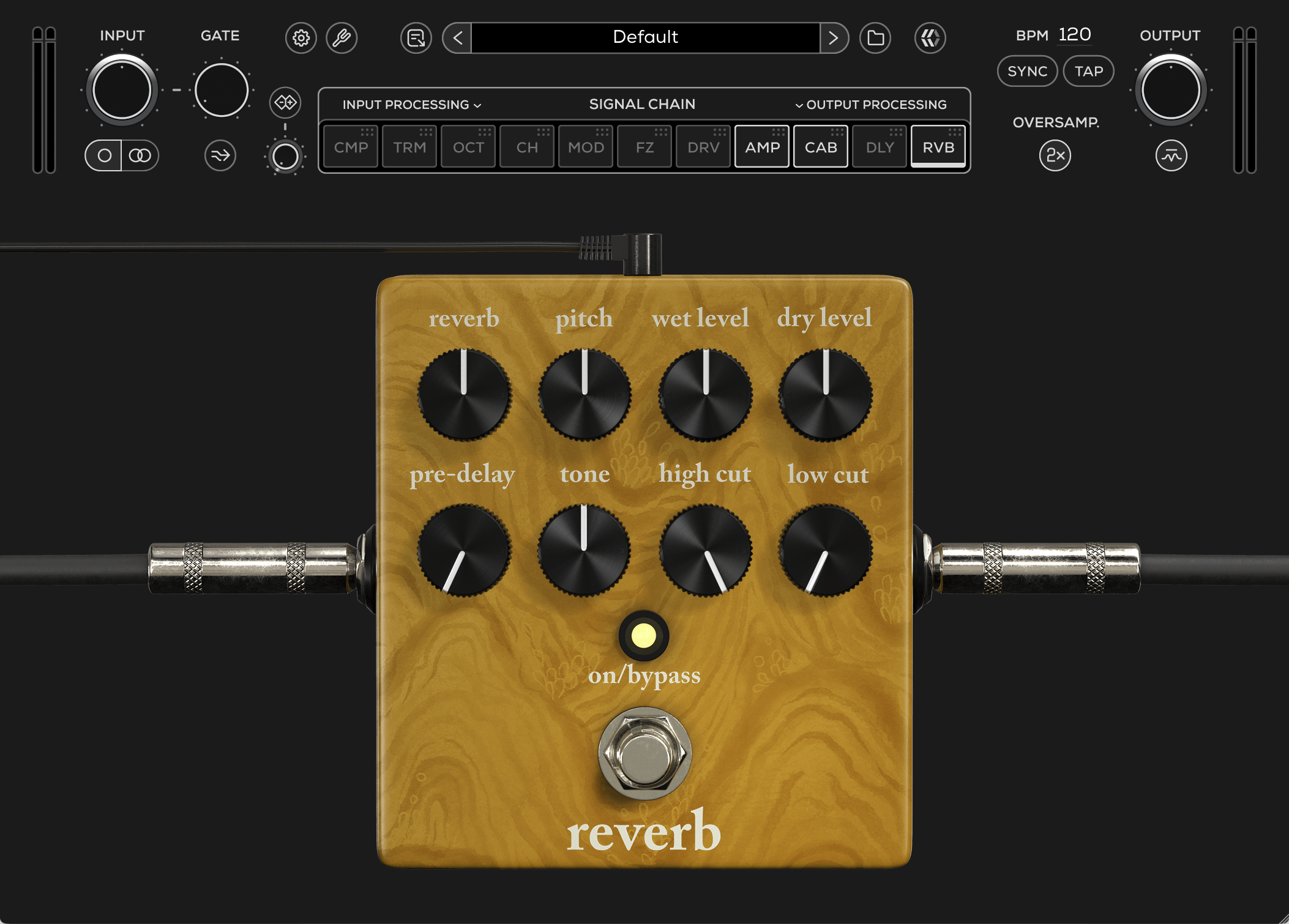
Reverb
Controls the amount of reverb applied to the signal, ranging from subtle ambience to larger atmospheric spaces.
Pitch
Blends octave-shifted layers into the reverb signal, adding additional depth, harmonic texture, and ambient character.
Wet Level
Adjusts the output level of the processed (wet) reverb signal.
Dry Level
Adjusts the output level of the original unprocessed (dry) signal.
Pre-Delay
Adjusts the time delay between dry and wet of the reverb effect.
Tone
Shapes the overall tonal balance of the reverb.
Lower settings produce a darker and smoother response, while higher settings add brightness and clarity.
High Cut
Applies a low-pass filter to the reverb signal to soften high frequencies and create a warmer, less bright ambience.
Low Cut
Applies a high-pass filter to the reverb signal to reduce low-frequency buildup and tighten the ambience.
On / Bypass
Engages or bypasses the Reverb effect.
Amplifier
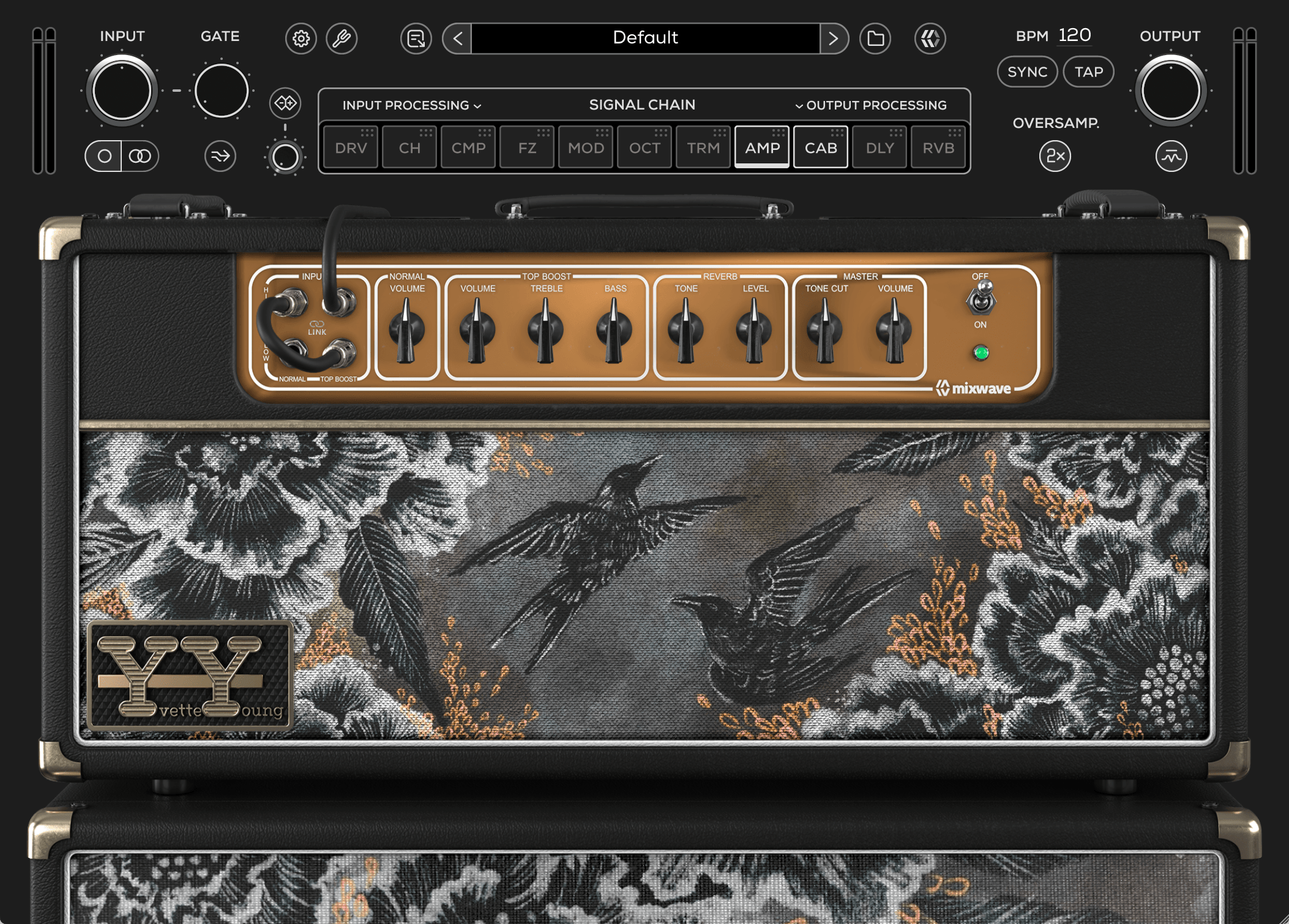
Input
Selects between the High and Low sensitivity inputs for the Normal and Top Boost channels.
The High inputs provide increased gain and a more immediate response, while the Low inputs offer additional headroom and a cleaner overall character.
Link Switch
Links the Normal and Top Boost channels together, allowing both channel circuits to run simultaneously. This recreates the classic “jumped channel” configuration, enabling the two channel volumes to be blended together for added depth, harmonic complexity, and tonal flexibility.
Normal Channel
Volume
Controls the gain level of the Normal channel preamp. Lower settings provide cleaner tones, while higher settings increase drive, saturation, and overall thickness.
Top Boost Channel
Volume
Adjusts the gain level of the Top Boost channel preamp. Lower settings produce cleaner, chime-focused tones, while higher settings introduce additional saturation and harmonic breakup.
Treble
Controls the high-frequency content of the Top Boost channel, ranging from smoother and darker tones to brighter, more cutting presence.
Bass
Controls the low-frequency response of the Top Boost channel, allowing tones to move from tighter and leaner to fuller and heavier.
Reverb
Tone
Shapes the tonal character of the reverb effect. Lower settings create a darker ambience, while higher settings produce a brighter and more present reverb response.
Level
Adjusts the amount of reverb blended into the signal, from subtle ambience to a more saturated and spacious effect.
Master
Tone Cut
Adjusts the high-frequency attenuation in the power amp section. Turning the control clockwise progressively reduces top-end presence, while lower settings retain more brightness and chime.
Volume
Controls the overall output level of the amplifier. The interaction between the Master and channel volumes determines the balance between clean headroom and power amp saturation.
Amp Power
Turns the amplifier On or Off.
Speakers & Cabinets
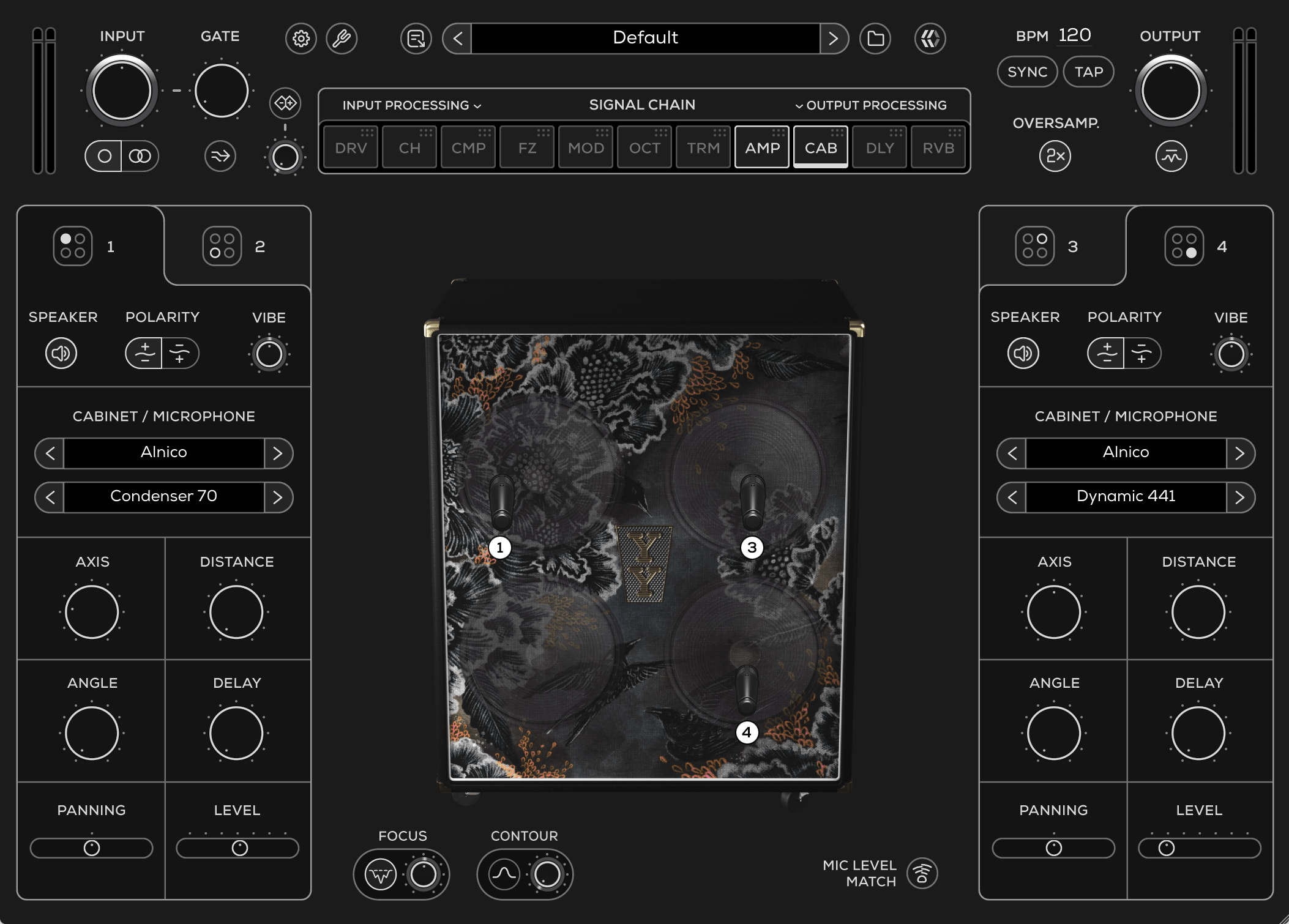
The cab module features a hand-wired British-style 1x12 dovetailed pine cabinet, featuring both Alnico Blue and Greenback speaker options alongside a collection of 15 virtual microphones.
The speaker and cabinet section of every MixWave amp plugin interface includes a range of features, outlined in the Amp Plugin Speakers & Cabinets article.
Microphones
Dynamic 57 – Punchy mids with a tight low end, a classic choice for aggressive and cutting guitar tones.
Dynamic 7B – Smooth and warm with a controlled top end, ideal for taming harshness and thickening brighter sounds.
Dynamic 409 – Forward and mid-focused with added bite, excellent for crunchy and driven tones.
Dynamic 421 – Full low-mids with a smooth high end, great for adding weight and body.
Dynamic 441 – Tight and detailed with focused lows and articulate highs, ideal for precise and controlled tones.
Dynamic R20 – Deep and balanced with reduced proximity effect, well suited for fuller cabinet captures.
Tube 147 – Rich and full-bodied with vintage warmth and depth.
Tube 251 – Open and airy with polished highs and extended detail.
Condenser 32 – Bright and highly detailed with fast transient response.
Condenser 4011 – Neutral and natural with extended high-frequency clarity for a true-to-source cabinet sound.
Condenser 84 – Smooth and balanced with natural upper-mid detail and controlled brightness.
Condenser 70 – Tight low end with clear articulation and focused midrange presence.
Copper – Midrange-focused and lo-fi with a distinctly honky, character-driven response.
Ribbon 122 – Warm and smooth with extended highs while retaining the natural body of the cabinet.
Ribbon 84 – Classic ribbon warmth with rich low-mids and silky high frequencies.
Speakers
Alnico – Chimey and articulate with smooth compression, sparkling highs, and dynamic touch sensitivity.
Greenback – Warm and mid-focused with woody breakup, rounded highs, and a more aggressive vintage character.