

In rare cases, Windows users may see a Microsoft Defender SmartScreen warning when downloading a MixWave plugin installer. When this happens, the installer may initially appear as a .crdownload file instead of a usable .exe.
This behavior does not indicate a problem with the installer itself. It simply means Windows is requesting confirmation before allowing the download to complete.

1
Keep the Download
In the Downloads panel of Microsoft Edge, locate the MixWave installer.
Click Keep.
2
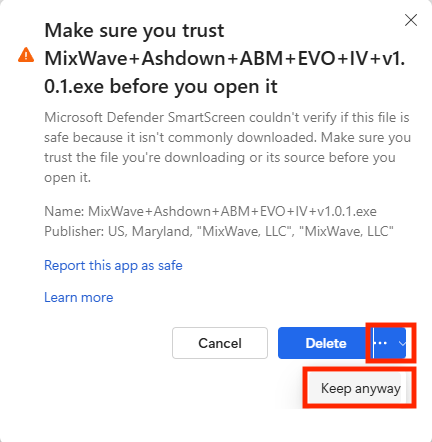
Confirm the Download
When prompted, click the three-dots menu next to the file.
Select Keep anyway.
3
Run the Installer
Once confirmed, the download will complete and appear as a standard
.exefile in your Downloads folder.Double-click the installer to run it.