

This guide covers the main features and controls of Periphery - Spencer Sotelo. For details on shared plugin features, see the Plugin Interface Overview.
Overview
As the voice of Periphery, Spencer Sotelo brings soaring melody and visceral aggression to the forefront of modern progressive metal. His expressive cleans and ferocious screams cut through the band’s intricate arrangements with unmistakable power and character.
Developed alongside Spencer, the plugin is modeled on the tools and sounds used to shape his vocals on every record since Periphery II. Each component is fine-tuned to his signature sound, bringing presence, control, and harmonic character into a focused yet versatile creative tool.
Artist Presets
The plugin includes presets from Spencer Sotelo, Andrew Baylis, Calin Enache, CASEY SABØL, Connor H. Carroll, Ekzakt, Eric Emery, Ernie Slenkovich, Johnny Morgan, LaGuil, Matt Good, Randy Slaugh, Ryan “Fluff” Bruce, Sean Robinson, Taylor Larson, and Zach Munowitz. Access them through the plugin’s preset menu.
Global Plugin Features
The global controls at the top of the plugin interface are detailed in the Mixing Plugin Global Features article.

Input Equalizer
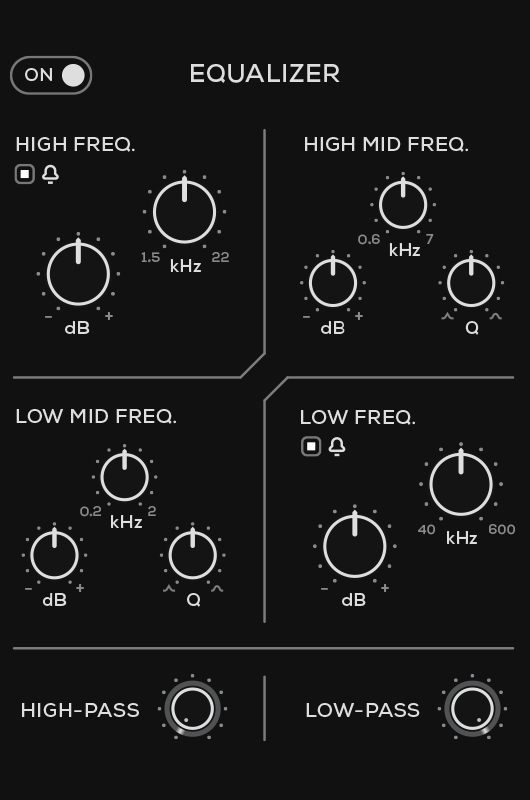
The Input Equalizer shapes the signal before it reaches the three main modules. It provides four frequency bands: High, High Mid, Low Mid, and Low.
The High and Low bands include adjustable frequency and gain controls and can be switched between bell and shelving filter shapes. The High Mid and Low Mid bands provide frequency, gain, and Q controls for more precise tonal shaping.
High-Pass
Sets the cutoff frequency below which low-frequency content is reduced.
Low-Pass
Sets the cutoff frequency above which high-frequency content is reduced.
Output Compressor
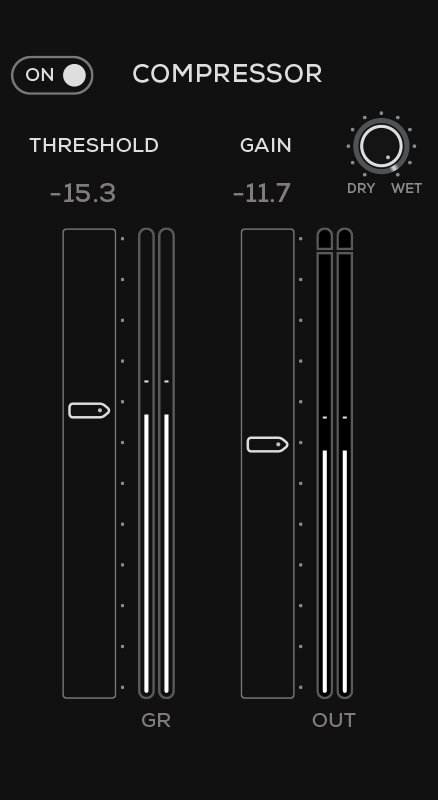
Controls the dynamics of the output signal after the three main modules. Use the On switch to enable or bypass the compressor.
Threshold
Sets the level above which the compressor reduces the signal. Lower the threshold to apply compression to more of the signal.
Gain
Adjusts the compressor’s output level.
Dry/Wet
Blends the Output Compressor’s compressed output with the signal entering it for parallel compression.
GR Meter
Displays how much the compressor is reducing the signal level.
Output Meter
Displays the compressor’s output level.
Output Limiter

Enables or bypasses the output limiter. When enabled, the limiter controls peaks at the plugin’s output. When bypassed, peaks are not limited, so monitor the output level to avoid clipping.
Operational Overview
Use the following workflow as a starting point for a vocal track, then adjust each stage to suit the recording and arrangement.
Signal Path
Input Equalizer → Presence → Compression → Saturation → Output Compressor
The Input Equalizer shapes the signal before it enters the main modules. Presence, Compression, and Saturation process the signal in that order, followed by the Output Compressor. Use the Input Equalizer and Output Compressor as needed.
Getting Started
Insert the plugin on your vocal track and start from Default or an artist preset. Play a section that includes both quieter phrases and louder peaks. Adjust Input as needed to avoid clipping.
Enable the Input Equalizer when the recording needs tonal adjustment. Use the high-pass filter to reduce unwanted low-frequency content, and use the EQ bands to address muddiness or harshness before the signal reaches Presence, Compression, and Saturation. Leave the EQ bypassed when the recording already has the balance you want.
Adjust Presence for brightness and definition. Turn Compression to control dynamics and create a more consistent vocal level, then use Saturation for harmonic color or a more driven sound. Presence and Saturation amounts appear on the left and right sides of the interface, respectively. Monitor compression on the VU meter below the main controls.
Enable the Output Compressor for additional dynamic control after Saturation. Adjust Threshold while watching the GR meter, then use Gain to set the compressor’s output level. Its Dry/Wet control blends the compressed output with the signal entering the Output Compressor for parallel compression.
Use the global Mix control to blend the plugin’s processed signal with the dry signal. Lower Mix to retain more of the original vocal while blending in the processed sound.
Adjust Output so the processed and bypassed signals are at similar listening levels. Listen with the rest of the arrangement and refine the settings as needed. Enable the Output Limiter when you want to control peaks at the plugin’s output.
The plugin can also add character to bass, guitars, overheads, and parallel drums. For a more pronounced effect, try combining input filtering with higher Saturation, then reduce the global Mix setting to blend that character into the original signal. The included presets provide starting points for these applications.
Periphery - Spencer Sotelo
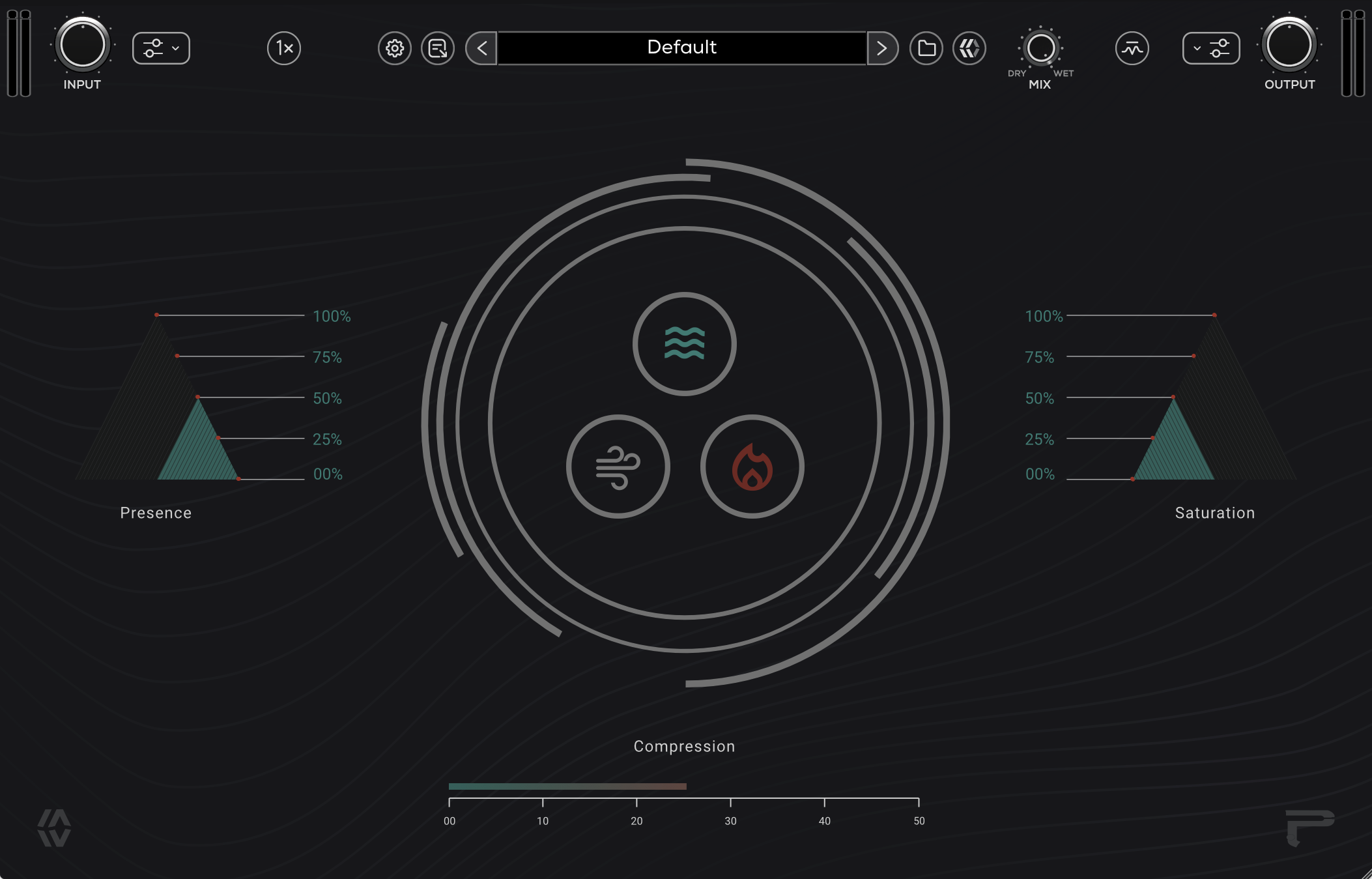
The main interface provides three controls for shaping the signal’s tone, dynamics, and harmonic character: Presence, Compression, and Saturation.
Turn the three central controls to adjust each module. Presence and Saturation amounts are displayed on the left and right, respectively. Monitor compression on the VU meter below the main controls.
Compression

Adjusts the amount of compression applied to the signal. Use it to control dynamic peaks and create a more consistent vocal level.
Presence

Controls the amount of high-frequency EQ applied to the signal. Use it to shape the vocal’s brightness and definition.
Saturation

Controls the amount of saturation applied to the signal, adding harmonic color and character. Increase it for a more driven sound, or reduce it for a cleaner tone.