

If you see an “Installation Failed” message in Native Access while installing a MixWave drum library, the issue is almost always related to Native Access configuration, system permissions, or OS-specific behavior.
Native Instruments provides the official troubleshooting steps for all installation-related issues across macOS and Windows. We recommend starting with their guides below, as they cover all known causes and solutions.
"Installation Failed" in Native Access
Instructions for resolving the "Installation Failed" error message in Native Access for macOS and Windows.
"Download failed" on macOS
Instructions for resolving the "Download Failed" error message in Native Access.
Native Access Error Messages & Solutions
A collection of solutions for all other reported error messages in Native Access for macOS and Windows.
External Drive Installation Issue (Workaround)
Native Instruments has confirmed a known issue on macOS 15.5+ that prevents some Kontakt libraries, from installing to external drives. If you are running macOS 15.5 or higher, you may be affected.
Install to the Default System Drive
In Native Access, reset content location to default:
Preferences > File Management > Restore Defaults
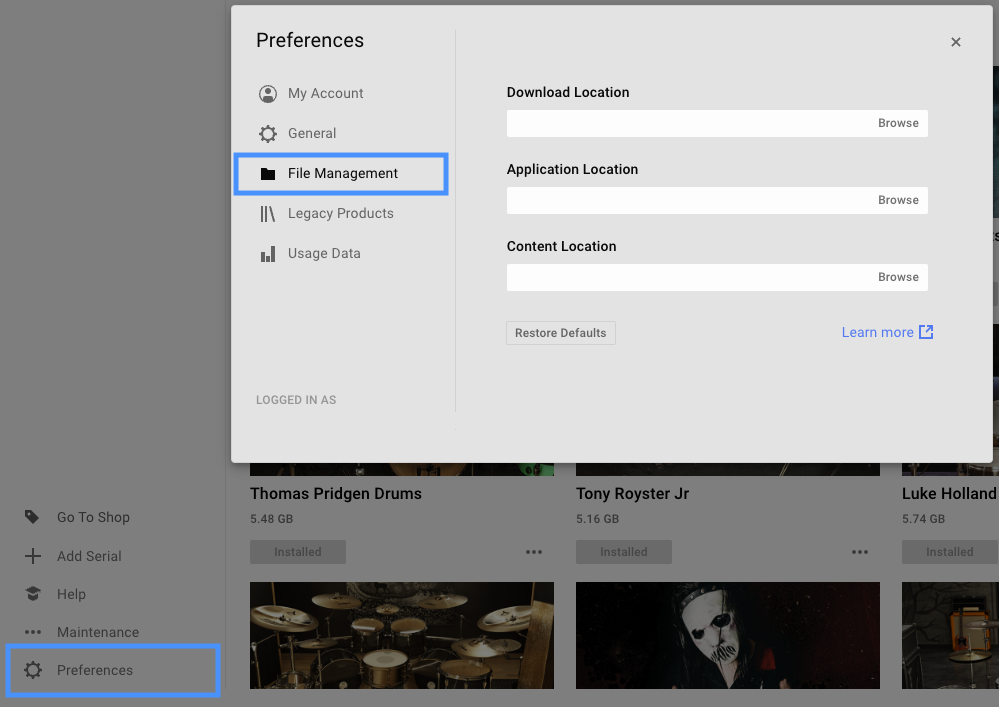
Locate the library in the Library tab, and click Install. This will install the library to your internal hard drive.
Relocating the Library After Installation
The library can then be relocated by moving the library to different location or support external location.
Additional Support
If you are still experiencing issues, Native Instruments provides solutions to commonly reported issued in their Knowledge Base. Otherwise, we strongly recommend to contact Native Instruments support directly as they will be able to provide more technical assistance.