

The following article is a condensed version of the user guide. You can learn about more features under the Plugin Interface Overview.
Overview
In pursuit of creating the most musical form of equalization, D.W. Fearn originally designed the VT-5 to deliver tone shaping that feels natural, expressive, and deeply satisfying to use. With a tube-driven character that enhances rather than alters, it brings out the best in any source with remarkable ease. It’s an EQ that feels intuitive and rewarding, lets mixes breathe and helps sounds sit with confidence. More than a tool, it embodies a philosophy: musicality is the true measure of great engineering.
Artists Presets
The plugin includes artist presets from Bainz, Daniel Escobar, Fluff, Jeff Braun, Migui Maloles, Taylor Larson and more. The presets can be accessed through the plugin preset menu.
Global Plugin Features

The top section of the plugin includes global controls such as:
Input Gain
Input Filters
Clean Mode
Oversampling
Settings
Preset Browser
About
Mix
Output Filters
Output Gain
Clean Mode
Clean Mode provides two selectable operating modes, indicated by the icon displayed in the top Global Plugin Controls section.

Clean Mode Off (Default)
The signal feeds the modeled tube and transformer stages at the level set by the Input Gain control, delivering the full harmonic character of the VT-5.

Clean Mode On
Reduces the level feeding the modeled tube stage by –10 dB and compensates with +10 dB at the output.
In Clean Mode, the internal gain structure is adjusted to generate less harmonic saturation, resulting in a more transparent response while maintaining overall level.
Operational Overview
The VT-5 is intentionally simple, musical and true to the philosophy of the hardware. Controls are made to be used in any combination, allowing simultaneous boost and cut on lows or highs.
Combining Low Boost and Low Cut can create powerful low-end shapes that retain punch while tightening sub frequencies. Likewise, pairing High Boost with High Cut allows you to enhance clarity and air while maintaining smoothness and control.
The Mid Cut begins broad and gentle at lower attenuation settings, making it ideal for reducing midrange buildup, and becomes more selective as deeper cuts are applied, which is useful for addressing specific resonances.
The High Cut at 28 kHz is particularly effective for smoothing digital edge or managing high-frequency artifacts, especially in modern recording environments.
The Input Level control manages headroom into the modeled tube and transformer stages, just as on the hardware. It can be used to maintain proper gain staging when applying significant boost, compensate for lower-level material, or subtly influence harmonic character through the input stage.
For a more transparent response, Clean Mode reduces the level hitting the modeled tube stage while compensating at the output, lowering harmonic saturation without changing overall level.
In the plugin, these behaviors are faithfully modeled, including the passive LC interactions, tube amplification stages, and transformer characteristics that define the VT-5 sound.
As with the original unit, there is no correct setting. Use your ears and adjust according to the musical goal.
D.W. Fearn VT-5 Controls
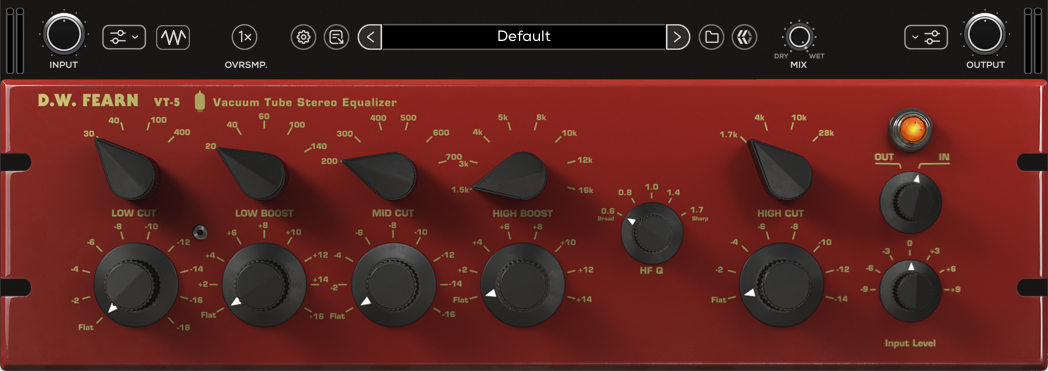
Low Cut Frequency Select
Determines the frequency of the Low Cut section. Available frequencies include: 30, 40, 100, or 400 Hz.
Low Cut Gain
Determines the amount of low cut shelving that is applied to the frequency set by the Low Cut Frequency Select knob from 0 (Flat) to -18 dB.
Low Boost Frequency Select
Determines the frequency of the Low Boost section. Available frequencies include: 20, 40, 60, 100, or 140 Hz.
Low Boost Gain
Determines the amount of low boost shelving that is applied to the frequency set by the Low Boost Frequency Select knob from 0 (Flat) to 16 dB.
Mid Cut Frequency Select
Determines the frequency of the Mid Cut section. Available frequencies include: 200, 300, 400, 500, 600, or 700 Hz.
Mid Cut Gain
Determines the amount mid cut that is applied to the frequency set by the Mid Cut Frequency Select knob from 0 (Flat) to -16 dB.
High Boost Frequency Select
Determines the frequency of the High Boost section. Available frequencies include: 1.5, 3, 4, 5, 8, 10, 12, or 16 kHz.
High Boost Gain
Determines the amount of high boost that is applied to the frequency set by the High Boost Frequency Select knob from 0 (Flat) to 14 dB.
HF Q (High Bandwidth Q)
Adjusts the high bandwidth Q of 0.6 (Broad), 0.8, 1.0, 1.4, or 1.7 (Sharp).
High Cut Frequency Select
Determines the frequency of the High Cut section. Available frequencies include: 1.7, 4, 10, or 28 kHz.
High Cut Gain
Determines the amount of high cut shelving that is applied to the frequency set by the High Cut Frequency Select knob from 0 (Flat) to -14 dB.
VT-5 Bypass (LED)
Engages or disengages the full VT-5 processing circuit. When active (LED lit), the EQ, tube stages, and transformer modeling are engaged. When bypassed, those stages are removed from the signal path.
Out/In
Switches only the EQ section in or out of the signal path. When In, the EQ is active. When Out, the EQ is bypassed, but the tube and transformer stages remain active. This allows you to hear the tube character without the EQ applied.
Input Level
Adjusts the input level of the VT-5 from -9 to +9 dB.