

The following article is a condensed version of the user guide. You can learn about more features under the Plugin Interface Overview.
Overview
What was once only explored in limited form, the D.W. Fearn VT-15 brings together the musical equalization of the VT-5 and the transparent, character-rich compression of the VT-7 in a single, cohesive design. Now brought to life in plugin form, it delivers a complete tube processing chain that feels natural, responsive, and deeply musical.
In partnership with D.W. Fearn, we’ve modeled the full signal path at the component level, capturing every transformer, tube stage, and interaction between EQ and compression. More than a combination of two processors, it’s a system where each stage enhances the other.
Artists Presets
The plugin includes artist presets from Bob Horn, Bryan DiMaio, Brycen10ial, Calin Enache, Cesar Sogbe, Connor H. Carroll, Daniel Escobar, Dom Morley, Drü Olivier, E. Dan, Ekzakt, Erik Ron, Fluff, Jeff Braun, Johnny Morgan, Joseph Chudyk, Keith Ross, KHTRASH, LaGuil, Maor Appelbaum Mastering, Matt Lange, Migui Maloles, Mike Cervantes, Mixedbyrac, MsM, Nacho Molino, and Stefan Brown. The presets can be accessed through the plugin preset menu.
Global Plugin Features

The top section of the plugin includes global controls such as:
Input Gain
Input Filters Dropdown
Clean Mode
Oversampling
Settings
Preset Browser
About
Mix
Output Filters Dropdown
Output Gain
Clean Mode
Clean Mode provides two selectable operating modes, indicated by the icon displayed in the top Global Plugin Controls section.

Clean Mode (Off)
The signal feeds the modeled tube and transformer stages of the EQ section at the level set by the Input Gain control, delivering the full harmonic character of the EQ section.

Clean Mode (On)
Reduces the level feeding the modeled tube stage of the EQ section by –10 dB and compensates with +10 dB at the output.
In Clean Mode, the internal gain structure is adjusted to generate less harmonic saturation, resulting in a more transparent response while maintaining overall level.
Operational Overview
The VT-15 is designed as a complete processing chain, combining the EQ section and compressor section into a single, unified signal path.
The Signal Chain control defines how these two sections interact. Placing the EQ before the compressor (EQ → Comp) allows tonal shaping to influence the compressor’s response—useful for controlling how specific frequencies trigger gain reduction. Reversing the order (Comp → EQ) applies compression first, followed by tonal shaping, which can feel more natural for final balancing and refinement.
The Input Level controls how hard the signal drives the modeled tube and transformer preamp stage of the EQ section. Depending on the selected signal chain, this stage will feed either directly into the compressor or follow it, influencing headroom, compression behavior, and overall harmonic character.
For a more transparent response, Clean Mode reduces the level feeding the tube stage of the EQ section while compensating at the output. This lowers harmonic saturation without changing overall level, allowing for more controlled or subtle processing when needed.
The EQ section features continuously variable controls (non-stepped), allowing precise adjustment between traditional values. The compressor section retains the stepped behavior of the original hardware where applicable.
Even when the EQ section is bypassed, the preamp stage remains active and continues to influence the signal.
As with the original hardware units, there is no correct setting—use your ears and adjust based on the musical goal.
Controls Grouping
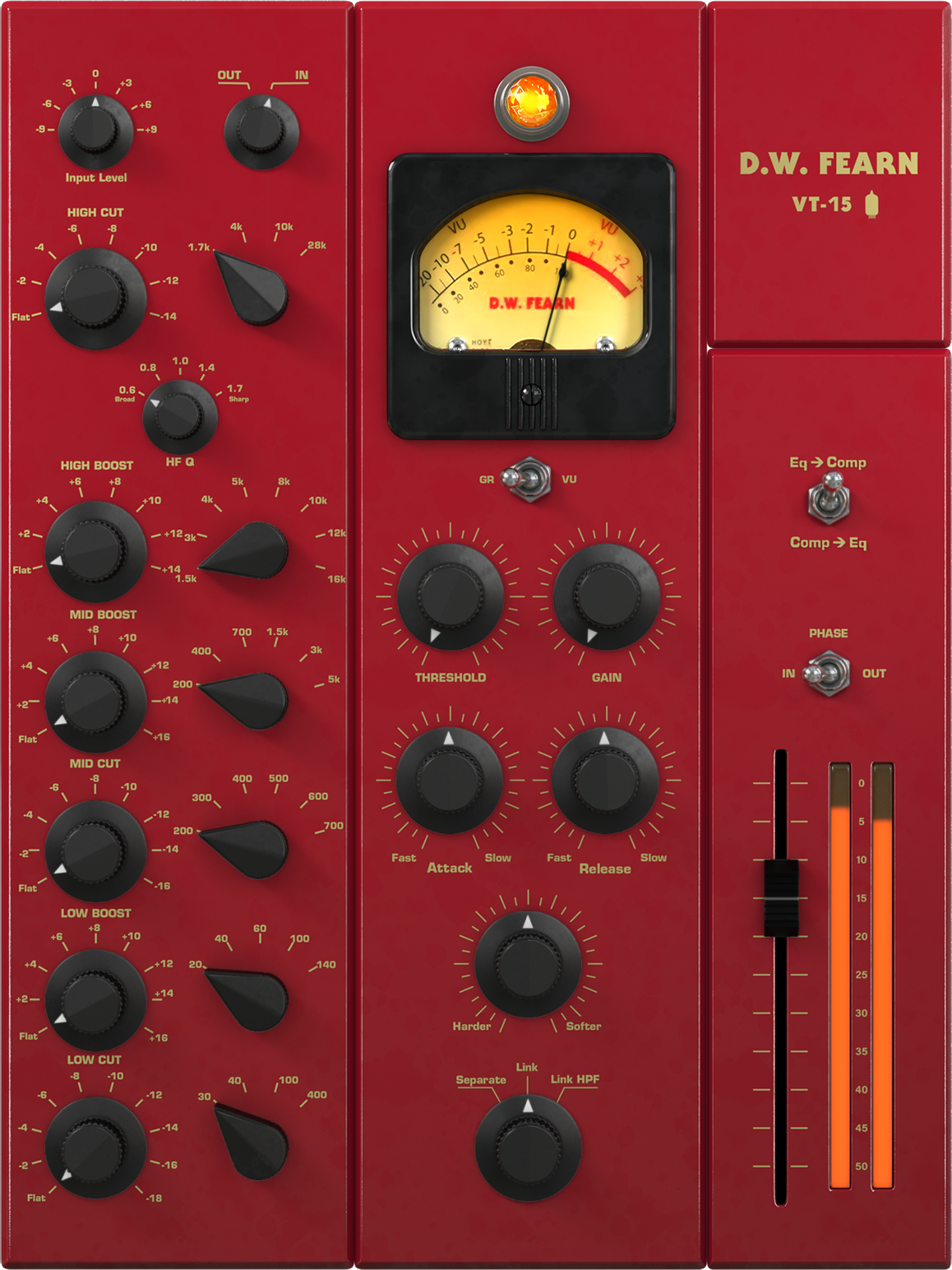
The VT-15 is organized into three primary control groups: EQ Section (Left), Compressor Section (Middle) and the Global Controls (Right).
Together, these sections form a complete signal chain, with the ability to reorder processing using the Signal Chain control.
EQ Section
Handles tonal shaping using passive equalization and a modeled tube preamp stage. This section is responsible for frequency balance and harmonic coloration.
Compressor Section
Provides dynamic control using a tube-based compression circuit, allowing for everything from subtle leveling to more pronounced shaping.
Global Controls
Located along the top of the interface, these provide overall control of the plugin, including input/output gain, filtering, Clean Mode, oversampling, and preset management.
D.W. Fearn VT-15 Controls
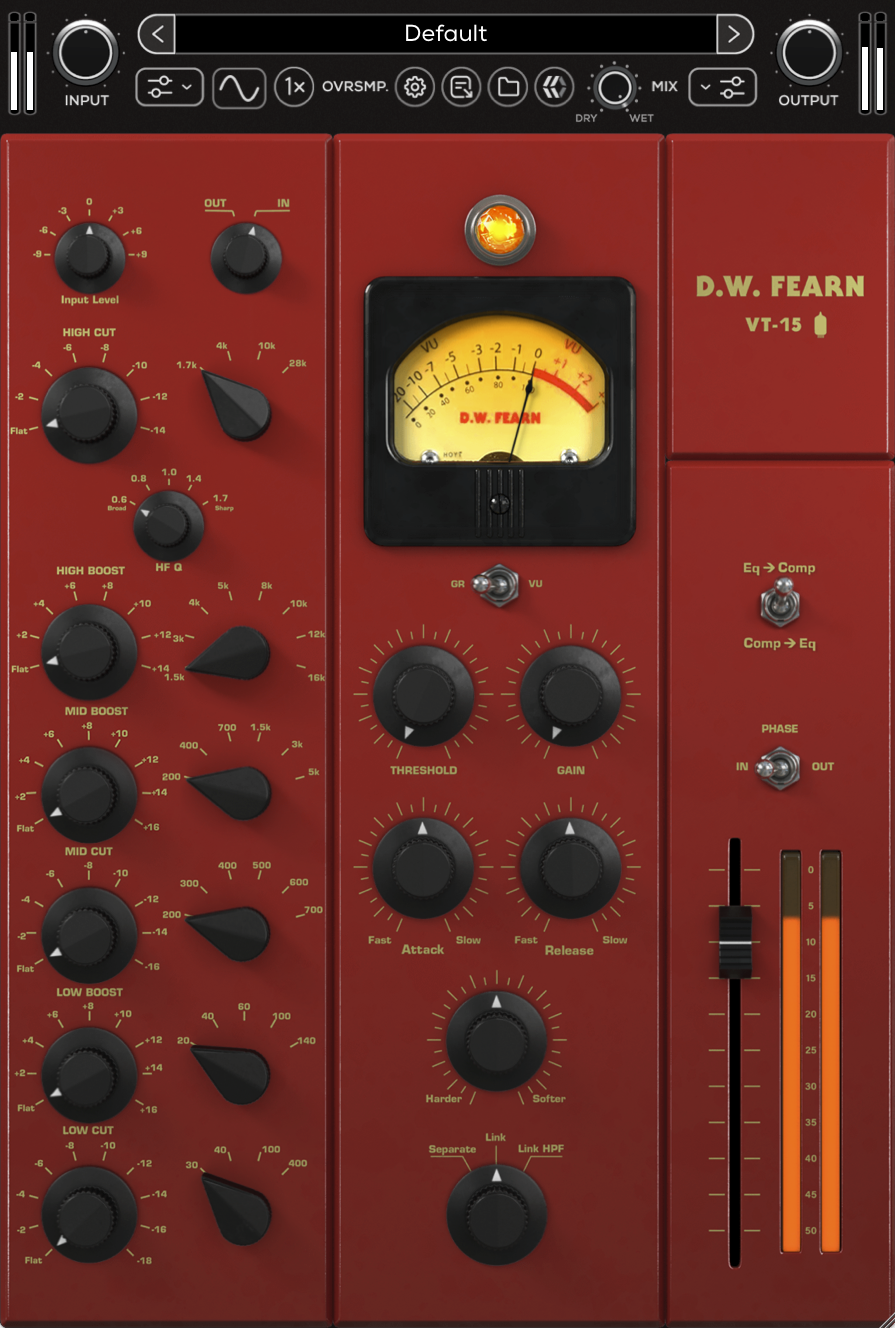
Signal Chain
Determines the processing order between the EQ section and compressor section.
EQ → Comp: The EQ section feeds into the compressor section.
Comp → EQ: The compressor section feeds into the EQ section.
Phase
Reverses the polarity of the signal.
IN: The signal remains in its normal polarity (in phase).
OUT: The signal polarity is inverted (out of phase).
Output Level
Adjusts the overall output level of the VT-15 at the end of the signal chain from -48 to +12 dB.
EQ Section
Input Level
Adjusts the input level feeding the EQ section preamp from -9 to +9 dB. The preamp stage remains active even when the EQ is set to Out.
Out/In
Switches the EQ section in or out of the signal path. When In, the EQ is active. When Out, the EQ is bypassed while the tube and transformer stages remain active, allowing you to hear the tube character without EQ applied.
High Cut Gain
Determines the amount of high cut shelving that is applied to the frequency set by the High Cut Frequency Select knob from 0 (Flat) to -14 dB.
High Cut Frequency Select
Determines the frequency of the High Cut section. Available frequencies include: 1.7, 4, 10, or 28 kHz.
HF Q (High Bandwidth Q)
Adjusts the high-frequency bandwidth Q of 0.6 (Broad), 0.8, 1.0, 1.4, or 1.7 (Sharp).
High Boost Gain
Determines the amount of high boost that is applied to the frequency set by the High Boost Frequency Select knob from 0 (Flat) to 14 dB.
High Boost Frequency Select
Determines the frequency of the High Boost section. Available frequencies include: 1.5, 3, 4, 5, 8, 10, 12, or 16 kHz.
Mid Boost Gain
Determines the amount of mid boost that is applied to the frequency set by the Mid Boost Frequency Select knob from 0 (Flat) to 16 dB.
Mid Boost Frequency Select
Determines the frequency of the Mid Boost section. Available frequencies include: 200, 300, 400, 500, 600, 700 Hz.
Mid Cut Gain
Determines the amount mid cut that is applied to the frequency set by the Mid Cut Frequency Select knob from 0 (Flat) to -16 dB.
Mid Cut Frequency Select
Determines the frequency of the Mid Cut section. Available frequencies include: 200, 300, 400, 500, 600, or 700 Hz.
Low Boost Gain
Determines the amount of low boost shelving that is applied to the frequency set by the Low Boost Frequency Select knob from 0 (Flat) to 16 dB.
Low Boost Frequency Select
Determines the frequency of the Low Boost section. Available frequencies include: 20, 40, 60, 100, or 140 Hz.
Low Cut Gain
Determines the amount of low cut shelving that is applied to the frequency set by the Low Cut Frequency Select knob from 0 (Flat) to -18 dB.
Low Cut Frequency Select
Determines the frequency of the Low Cut section. Available frequencies include: 30, 40, 100, or 400 Hz.
Compressor Section
Bypass (LED)
Engages or disengages the compressor section. When bypassed, audio passes through unaffected. The LED illuminates when the compressor is active, mirroring the function of the hardware pilot lamp.
Meter Switch
Toggles the meter display between VU (output level) and GR (gain reduction).
VU - Displays the actual output level, calibrated so “0 VU” equals +4 dBu.
GR - Shows the average amount of gain reduction in dB.
Threshold
Adjusts the point where compression begins. With the control turned fully counter-clockwise (left), no compression is applied and the compressor section functions as a straight amplifier. Turning the control clockwise (right) lowers the threshold, increasing the amount of compression. The applied gain reduction can be monitored on the meters (set to GR) or simply by ear.
Gain
Provides makeup gain to restore level lost through compression. With no compression and the control fully counter-clockwise (left), output level sits around -3 dB. Up to +15 dB of gain is available as the control is turned clockwise (right).
Attack
Sets how quickly the compressor section responds when the signal exceeds the threshold. Faster attack times clamp down immediately on peaks, useful for controlling maximum levels (e.g., protecting a digital input from overload). However, very fast settings can introduce distortion, especially on low-frequency material. Slower attack times allow transients (like drum hits) to pass through before compression engages, often resulting in a more natural, punchy sound.
Release
Controls how quickly gain reduction returns to normal once the signal falls back below the threshold. Fast release times add density and excitement but may increase distortion, particularly in low-frequency material. Slower release times smooth out compression and sound more transparent, though in certain cases can cause “holes” in the audio if loud, percussive sounds dominate.
Harder/Softer
Adjusts the shape and character of the compression curve. Moving toward Harder increases ratio and tightens level control; moving toward Softer reduces ratio and yields gentler compression. This control also alters additional internal parameters beyond ratio, so its effect is best judged by ear. It interacts with Threshold, Attack, and Release, so further fine-tuning is recommended after adjustment.
Link
Controls how the compressor section processes stereo signals.
Separate – The left and right channels are processed independently, allowing each side to respond to its own signal.
Link – The channels are linked, applying identical gain reduction to both sides for a stable stereo image.
Link HPF – Functions the same as Link, but with a high-pass filter in the detector circuit to reduce sensitivity to low frequencies and minimize pumping.