

The following article is a condensed version of the user guide. You can learn about more features under the Plugin Interface Overview.
Overview
Developed in collaboration with Grammy-winning mixer and engineer Dave Clauss, Valvocoil combines vintage-inspired spring reverb with expressive drive and saturation. Drawing inspiration from tube and spring hardware of the 1960s, it brings rich ambience, harmonic color, and grit to vocals, guitars, drums, and more.
Separate Drive Mix and Verb Mix controls let you balance texture and depth, while expanded tone controls, high- and low-pass filters, adjustable decay, and pre-delay help tailor the sound to the track. The global Dry/Wet control sets the final blend.
Artists Presets
The plugin includes presets from Dave Clauss, Ben West, Chris LaCorte, Dani Pampuri, Daniel Escobar, Ekzakt, Johnny Morgan, Aaron Sterling, and more. Access them through the plugin’s preset menu.
Global Plugin Features

The top section of the plugin includes global controls such as:
Input Gain
Input Filters
Oversampling
Settings
Preset Browser
About
Output Gain
Operational Overview
Valvocoil combines spring reverb and drive, letting you add space, harmonic color, or both. Use Drive Mix to blend in saturation and Verb Mix to blend in reverb. Shape the sound with the tone controls and filters, then adjust Intensity, Pre Delay, and Decay to set the reverb’s character and response. Use Dry/Wet to balance the complete processed sound with the original signal.
Dave Clauss Valvocoil Controls
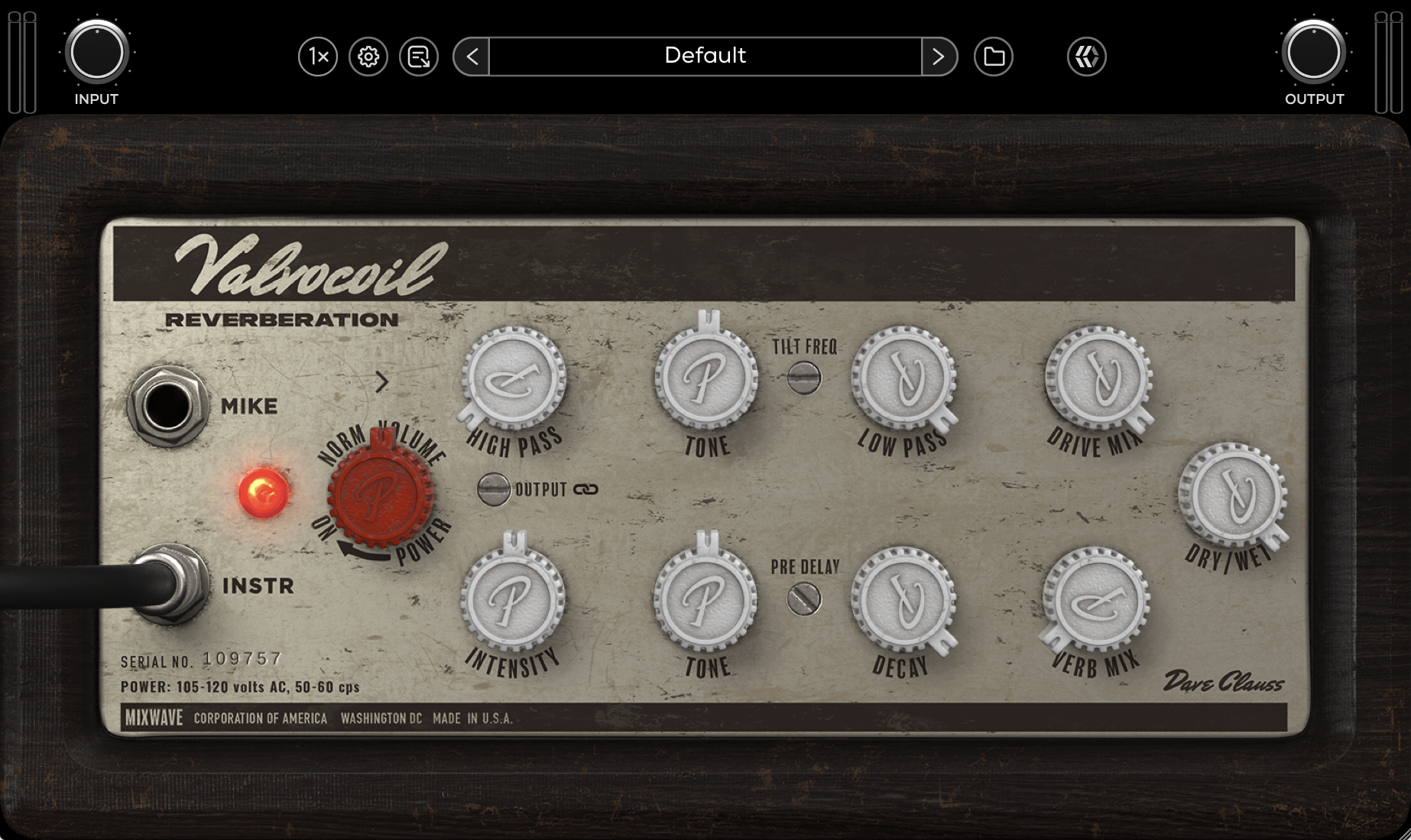
Mike & Instr
Selects the input level feeding the unit, affecting the amount of saturation blended in with Drive Mix.
Pre / Post
Places the tilt EQ before (Pre) or after (Post) the drive stage. Use Pre to shape the tone going into saturation, or Post to shape the saturated sound.
Norm Volume
Controls the main input level.
High Pass
Filters out low frequencies from the reverb signal to clean up low-end rumble.
Tone (Top)
Applies a tilt EQ, boosting high frequencies while reducing lows, or boosting lows while reducing highs, around the frequency set by Tilt Freq.
Tilt Freq
Sets the center frequency around which the top Tone control tilts the frequency balance.
Low Pass
Filters out high frequencies from the reverb signal to soften the top end.
Drive Mix
Blends the saturated signal with the original signal.
Intensity
Adjusts the intensity of the reverb effect, shaping its depth and density.
Tone (Bottom)
Adjusts the brightness or warmth of the reverb.
Pre Delay
Sets the time between the original sound and the start of the reverb, helping to separate the source from the effect.
Decay
Sets the length of time it takes for the reverb tail to fade out.
Verb Mix
Blends the reverb effect with the original signal.
Dry / Wet
Sets the overall balance between the unprocessed dry signal and the processed signal, including drive and reverb.