

The following applies exclusively to customers within the EU.
Why Is VAT Applied to My Order
EU regulations require businesses selling digital products to EU customers to charge Value-Added Tax (VAT) based on the applicable rate for each country. To comply with these regulations, VAT is automatically calculated and displayed during checkout.
While this may result in a higher final price for EU customers, please note that MixWave’s base prices remain unchanged—VAT is simply applied as required by law.
Are Product Prices on the MixWave Website Inclusive of VAT?
No. All prices displayed on the MixWave website exclude VAT. If you are in an EU country where VAT is applicable, the correct VAT amount will be calculated and added during checkout.
How Can I Avoid Paying VAT?
If you are a business in the EU with a valid VAT Tax ID, you can automatically exempt VAT tax from your order by proceeding with the following steps:
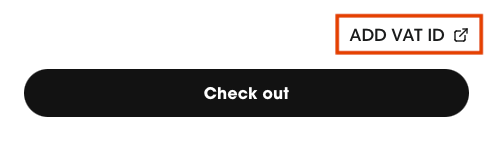
Click ADD VAT ID located at the bottom of the Cart before the Checkout button. The Email and VAT ID text fields will appear.
Enter your email address and valid TAX ID number and click Submit.
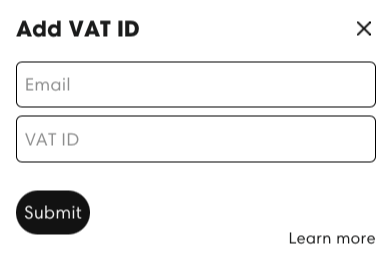
The email address entered here must match the email used at checkout.
Using a different email (for example, a business email here and a personal email at checkout) will prevent the VAT exemption from being applied.
Once your VAT ID is verified, Close the popup and click Checkout to enter your payment details and complete your purchase. Any VAT taxes will be exempt from your order.
After your order is placed, you can retrieve your invoice by following the steps outlined in the View & Print Order Invoice article.
VAT ID Entry & Verification
Ensure that you enter your VAT ID in the correct format. For example, an Italian VAT ID would be IT0123456789 (where IT represents Italy). You can find the country codes for VAT identification here.
Our system validates VAT numbers using the EU VAT Information Exchange System (VIES), which only supports EU-issued VAT IDs.
If your VAT ID is marked as invalid, this can happen for two different reasons:
Double-check the formatting (including country prefix)
Verify your VAT ID using the EU VAT Information Exchange System (VIES)
If it does not appear as valid there, we’re unfortunately unable to override or manually validate it
If your business is based outside of the EU:
Your VAT ID will not validate through VIES, even if it is correct
In this case, there is no need to enter a VAT ID at checkout
VAT typically will not be applied to your order based on your location
API Overloaded Error When Entering VAT Number
If you see an error message such as "Please try again, the EU API was overloaded" when entering your VAT number at checkout, this is typically due to temporary downtime or high traffic on the EU VAT Information Exchange System (VIES) servers.
Our VAT validation system relies on VIES to verify numbers in real time. When their servers are overloaded or unavailable, validation requests may fail. In this case, we can only recommend waiting and periodically checking your VAT number using the EU VAT Information Exchange System (VIES).
VAT Refund Policy
Unfortunately, we are unable to refund VAT after a purchase or for past orders, as VAT is a government-imposed tax and is legally beyond our control. However, you may be able to reclaim the VAT through your local tax authority at the end of the financial year.
The only way to exempt VAT from your order is by adding your VAT ID before checkout. Be sure to enter your VAT ID and your order email address using the ADD VAT ID button before checkout to ensure the exemption is applied.